ImagePrep360
Launch pricing, TBD Launch pricing, subject to change.
- Free$0 forever
- Pro$12 per month
- Pro, yearly$99 per year
- Free
- Free plan with a daily limit (provisional)
- Trial
- TBD
- Refunds
- TBD
Sources 44
Six tools people use to turn photos into engraving files. ImagePrep360 and ImagR prepare the file in a browser. LightBurn, LaserGRBL and xTool Studio also drive the laser, which we don’t: we export files for your laser software. LightBurn is a one-time license; xTool Studio and LaserGRBL are free.
As of November 6, 2026. Jump to the measured quality benchmark.
| Feature | ImagePrep360Web app · Browser | ImagRWeb app · Browser | LightBurnDesktop app · Windows, macOS | xTool StudioDesktop app · Windows, macOS | LaserGRBLDesktop app · Windows | Atomm Laser PrepWeb app · Browser |
|---|---|---|---|---|---|---|
| Getting a file | ||||||
| One-click photo to engraving fileUpload, pick a material, get a laser-ready file without manual tuning. | Yes44 | Yes14One Click mode | No11Manual Adjust Image | Partly2426Auto Adjust, then pick a mode | No3334Manual import dialog | Yes40Upload, pick material, Generate |
| Material presetsBuilt-in processing presets per engraving material. | Yes4410 materials | Yes310 materials | Partly17User-built Material Library | Partly28Laser-parameter material library | No3334None documented | Partly40Wood, metal, acrylic and more |
| Guided mode with fine-tune slidersA step-by-step flow with sliders to adjust the result. | Yes44Easy Mode: crop, sliders, loupe | Yes14Easy Mode: crop + 8 sliders | Partly11Adjust Image sliders + presets | Partly2425Adjustment sliders in editor | Partly3334Import dialog sliders | Partly40Contrast tweaks before download |
| Live preview on the materialSee the dithered result rendered on a material texture before engraving. | Yes44Preview on material | Yes1Preview on Material tab | Partly11Side-by-side processed preview | Partly23“True Result Preview” listed | Partly33Image preview, no material | Partly40Preview before download |
| Crop, physical size and DPICrop the photo and set the output size and resolution. | Yes44Crop, size in in/mm, DPI | Yes1Crop, size in in/mm, DPI | Yes1013Size, line interval/DPI, masks | Partly2425Crop and resize; DPI not verified | Yes3335Crop, size in mm | Not documented |
| DPI guidance for your laser typeHelp choosing a resolution for diode, CO₂ or fiber lasers. | Yes44Diode, CO₂, CO₂ fine, fiber | Yes13DPI guide, calculator, DPI Test | Partly18Interval Test tool | Not documented26Mode tips by laser type only | No35Not covered in sizing docs | Not documented |
| Image quality | ||||||
| Dithering algorithmsWays to turn grey tones into laser dots. | Yes44Ultra, error diffusion, Bayer | Yes120 options in Easy Mode | Yes1010 image modes | Yes267 bitmap modes | Yes368 error-diffusion + random | Not documented |
| Optimized (error-minimizing) ditherImagePrep360 Ultra: a Direct Binary Search optimizer that minimizes visible error, used by default. | Yes44Ultra (DBS), the default | Not documented1Profile methods not published | No10Not among the 10 modes | No26Not among the 7 modes | No36Error diffusion and random only | Not documented |
| Automatic tone and contrastAdjusts levels and contrast for the material automatically. | Yes44 | Yes2Automatic contrast & dithering | No11Not in Adjust Image docs | Yes2324Auto Adjust / Smart Adjust | Not documented | Yes40AI contrast and sharpening |
| Background removalCut the subject out of the photo. | Yes44AI tool, pick the model | Yes15AI, 4 models | No1320Not in image tools docs | Yes2324AI Cutout | No33Not in raster import docs | Partly40Separate Atomm tool |
| AI upscalingIncrease resolution of small photos before engraving. | Yes442× or 4×, SeedVR2 default | Yes15AI Upscale 2×–16× | No1320Not in image tools docs | Partly23Auto Enhance (resolution) | No33Not in raster import docs | Partly40Separate Atomm tool |
| Old-photo restorationRepair scratches and damage on old photos. | Yes44AI tool, pick the model | Yes5Photo Restoration (AI) | No1320Not in image tools docs | Not documented | No33Not in raster import docs | Not documented |
| Colorize black-and-white photosAdd colour to old photos, e.g. for colour previews or colour engraving. | Yes44AI tool, pick the model | Yes5Photo Colorization (AI) | No1320Not in image tools docs | Not documented | No33Not in raster import docs | Not documented |
| Denoise and deblurClean up noisy or soft photos. | Yes44AI tool, pick the model | Partly1Denoise/sharpen filters (non-AI) | Partly12Enhance Denoise (non-AI) | Yes25AI Enhance | Not documented | Not documented |
| Editing | ||||||
| Precise recolor of exact partsChange the colour of chosen parts only, without redrawing the rest of the image. | Yes44Structured Edit with guard | Not documented1Not seen in our review | No13Not in image tools docs | Partly2425Prompted AI Replace / Magic Edit | No33Not in raster import docs | Partly40AI Replace (prompted), separate |
| Vectorize logos to SVGTurn logos and line art into vector paths. | Yes44AI tool, SVG download | Yes15Vectorize, 2–32 colours | Yes1314Trace Image | Yes2425Trace | Yes33Vectorize tool | Partly40Separate Image Vectorizer |
| AI design from a text promptDescribe a design and get a new, engraving-ready image. | Yes44Create: 5 styles, lettering, 4 models | No546Not in its Toolset or AI FAQ | No1320Not in image tools docs | Yes24AImake, text or image (sign-in) | No3233Not in docs | Partly50Separate Atomm AI |
| Jigsaw puzzle generatorTurn a photo into a laser-cut jigsaw: engrave layer plus cut path. | Yes44Engrave PNG + one-pass cut SVG | Yes45Puzzle Generator, 4 shapes | No48Docs use an external generator | Yes47Puzzle Generator | No3233Not in docs | Partly49Separate Puzzle Generator |
| Save and re-run workflowsSave a processing recipe and apply it to new photos. | Yes44Saved recipes | Yes12Record, save, run workflows | Partly1117Material Library, image presets | Not documented | Not documented | Not documented |
| Volume | ||||||
| Batch processing of many photosProcess a folder or a multi-file selection in one go. | Yes44Folders, ZIP or folder output | Yes12One Click and Run Workflow | Partly14Multi-file trace to SVG only | Not documented | Not documented | Not documented |
| Google Drive import and exportRead photos from and write results to Google Drive. | No44Coming soon | No12Not listed or seen | No15No integration documented | Not documented24Own Cloud Space instead | Not documented | Not documented |
| Parallel processingSeveral photos processed at the same time. | Yes44Parallel workers | Not documented1Run Workflow seen one at a time | Not documented | Not documented | Not documented | Not documented |
| Output | ||||||
| PNG export | Yes44 | Yes13 | Partly1521Export excludes adjustments | Not documented24Not in documented exports | Not documented32Outputs G-code | Not documented |
| 1-bit BMP exportBlack-and-white bitmap, one bit per pixel. | Yes44 | Yes1 | Not documented21Processed-save format undocumented | Not documented24Not in documented exports | Not documented32Outputs G-code | Not documented |
| 24-bit BMP export | Yes44 | Yes1 | Partly15Export excludes adjustments | Not documented24Not in documented exports | Not documented32Outputs G-code | Not documented |
| LightBurn project (.lbrn2)Opens in LightBurn with size and position set. | Yes44 | Yes12 | Yes15Native project format | No24Saves .xcs; exports SVG | Not documented | Not documented |
| SVG export | Yes44From the Vectorize tool | Yes5Vectorize, Contour, Monogram | Yes15Export AI, SVG, DXF | Yes24Export as SVG | Not documented | Not documented |
| Mirror for glass and acrylicFlip the image to engrave the back of clear material. | Yes44On for glass and acrylic | Yes1Flip horizontal | Yes16Flip Horizontal | Yes24Reflect horizontally | Yes33Flip in import dialog | Not documented |
| Send directly to a laserStart the engraving job from the same app. | No44Export to your laser software | Partly1Beta: USB via the browser | Yes67Laser control software | Partly2223xTool machines only | Yes32GRBL lasers | Not documented |
| Organization | ||||||
| Gallery, projects, tags, favoritesKeep finished files organized in the app. | Yes44Projects, swatches, tags, favs | No1Not offered (account page) | Partly15Art Library for designs | Partly2324My Space cloud projects | Not documented | Not documented |
| Usage dashboardStats on what you processed and what AI tools cost. | Yes44Usage, AI spend, per member | No1Account page shows plan only | Not documented | Not documented | Not documented | Not documented |
| Usage export (CSV)Download the usage log as a spreadsheet. | Yes44Workspace or device log | No1No usage dashboard | Not documented | Not documented | Not documented | Not documented |
| Team or shared workspaceSeveral people working in one account. | Partly44Roles and invites, rolling out | No2No team plan listed | Partly93 seats per license | Not documented | Not documented | Not documented |
| Platform | ||||||
| Runs in the browser, no install | Yes44 | Yes3Needs WebGL | No8Desktop install | No2223Desktop install | No32Windows install | Yes40 |
| Desktop app | No44Web app | No3Browser only | Yes8Windows 10+, macOS 13+ | Yes27Windows 10, macOS 11+ | Yes32Windows | No40Web tool |
| Works offline | Yes44One Click offline after the first visit | Not documented | Yes19Offline activation for keys | Partly2429Cloud and AI need internet | Yes32Desktop app, no account | Not documented |
| Photos processed on your deviceWhether your photo stays on your computer or is uploaded for processing. | Yes44All but AI steps | Partly13One Click and AI tools upload | Yes8Desktop software | Not documented24AI tools use credits/login | Yes32Desktop software | Not documented40Not stated clearly |
| Free tier | Not documented44Pricing not final | Yes233 images/day, no signup | No68Trial, then license | Yes30Free; some features use credits | Yes32Free, open source | Partly4041Free to try; 200 credits |
| Free trial | Not documented44Pricing not final | Yes2Via free tier (3/day) | Yes830 days | Yes30Free to use | Yes32Free to use | Yes40Free to try |
| Money-back guarantee | Not documented44Pricing not final | Yes330 days | Partly7Refunds case by case | Not documented30Free app | Not documented32Free software | Not documented |
Launch pricing, TBD Launch pricing, subject to change.
Sources 44
$19/mo, $99 per 6 months, $159/yr
Core $99, Pro $199 one-time; updates $40/yr after year 1
Free; some features use credits
Free, open source (donations welcome)
Free to try; Atomm Pro $9.90/mo or $99/yr; Max $14.90/mo or $129/yr (credits)
Method. Three public-domain test photos (an astronaut portrait, a cat and a cup of coffee), each prepared for wood, black slate and anodized aluminum at 4 inches wide and 254 DPI: 9 cases. ImagR used One Click in a logged-in account with only the material, width, DPI and dithering set; ours used One Click defaults. Both outputs were scored by the same code, with ImagR scored inside its own page against its own decoded copy of the source. Each score models the eye and laser spot as a σ 1.5 px blur. Lower is better. Full method and rubric · our scores · ImagR scores
Result: lower structural error (1 − SSIM) than ImagR One Click in 9 of 9 cases, lower GMSD in 9 of 9, and lower tone error in 9 of 9. Our One Click took 0.48 to 0.76 seconds per case in Node.
| Case | 1 − SSIM | GMSD | Tone error | |||
|---|---|---|---|---|---|---|
| Ours | ImagR | Ours | ImagR | Ours | ImagR | |
| Astronaut portrait · Wood | 0.082 | 0.453 | 0.049 | 0.204 | 0.020 | 0.143 |
| Astronaut portrait · Black Slate | 0.070 | 0.437 | 0.050 | 0.218 | 0.004 | 0.141 |
| Astronaut portrait · Anodized Aluminum | 0.080 | 0.437 | 0.048 | 0.218 | 0.007 | 0.141 |
| Cat · Wood | 0.066 | 0.442 | 0.054 | 0.264 | 0.028 | 0.131 |
| Cat · Black Slate | 0.060 | 0.464 | 0.052 | 0.269 | 0.015 | 0.137 |
| Cat · Anodized Aluminum | 0.064 | 0.464 | 0.054 | 0.269 | 0.018 | 0.137 |
| Coffee · Wood | 0.142 | 0.449 | 0.051 | 0.231 | 0.026 | 0.170 |
| Coffee · Black Slate | 0.130 | 0.465 | 0.053 | 0.239 | 0.009 | 0.181 |
| Coffee · Anodized Aluminum | 0.142 | 0.465 | 0.052 | 0.239 | 0.014 | 0.181 |
| Mean of 9 | 0.093 | 0.453 | 0.051 | 0.239 | 0.016 | 0.151 |
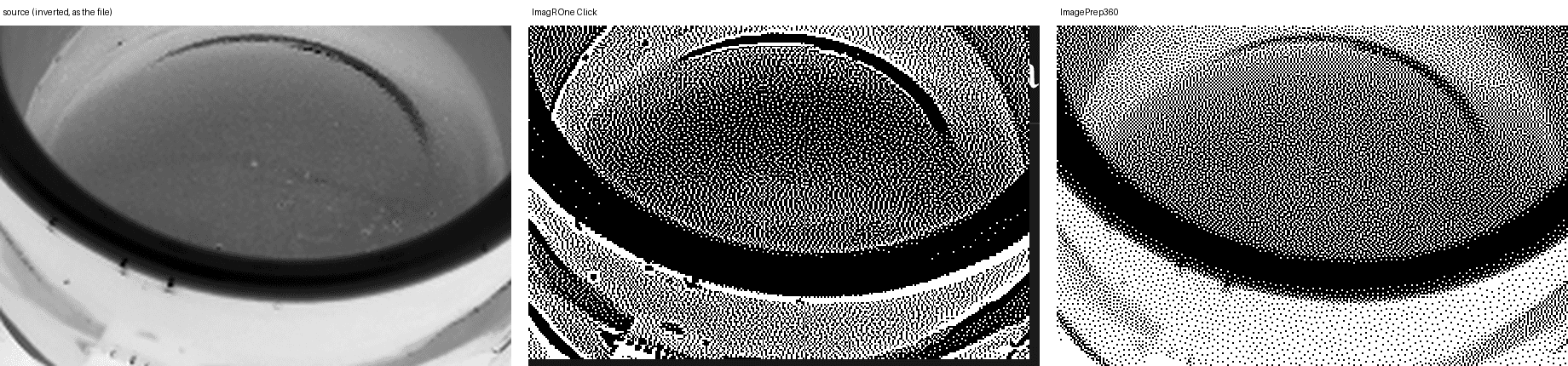
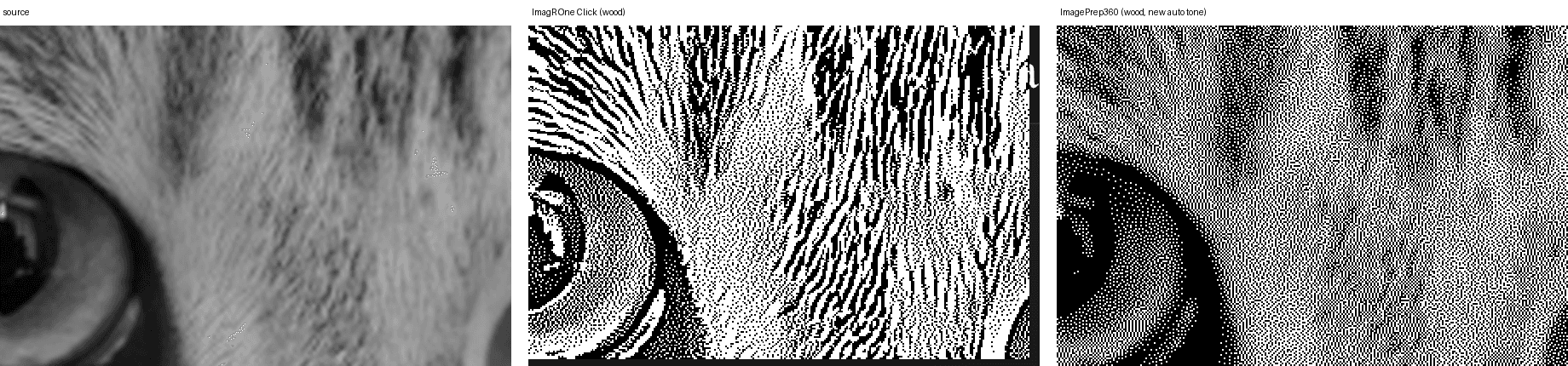
ImagR’s output is punchier and higher-contrast: whiskers and the cup rim read crisply from a distance. That costs streaks in fur and foam, solid black blocks where the photo has detail, halos along edges, and tones that drift from the photo. Ours is more faithful to the photo and has no directional streaks, but thin, low-contrast features such as single whiskers and the foam edge come out fainter. The Punchy and Moody looks trade some fidelity for impact if you want it. We still need to confirm the simulation with real test burns.
Features subject to change. Tell us if something is out of date: corrections@example.com (placeholder address).